Chapter 1 · 1 min 21 sec
Start a DA readiness review
Create a project, select the DA pathway and confirm a focused initial evidence scope.
AxiomReady
Build 0.1.0
Read-only workflow reference
AxiomReady connects Brief, Pathway, Target States, Requirements/Evidence, Findings, Consultants, Actions, Communications and Readiness. This v2 reference explains the controlled lifecycle from source intake through human review, coordination and CC finalisation. It makes gaps and next actions visible; it does not issue approvals, certificates or authority decisions.
CC boundary: CC submission-ready at 100% means ready for external submission. It does not mean a Construction Certificate has been issued. CC authorisation received requires reviewed external authority evidence.
Video walkthrough
The four chapters follow the same DA-to-CC journey shown in this guide. Videos open in a player dialog and never alter project data.
4 chapters - narrated
Chapter 1 · 1 min 21 sec
Create a project, select the DA pathway and confirm a focused initial evidence scope.
Chapter 2 · 2 min 2 sec
Run the site investigation, review public-source cues and add the first evidence item.
Chapter 3 · 1 min 46 sec
Review the matched evidence, close DA checklist items and reach DA readiness.
Chapter 4 · 2 min 55 sec
Move into the CC pathway, record external authority evidence and complete the handoff.
All general and Pilot DA → CC guide sections
1. Brief
Start with a Brief: project identity, scope, site, stage, participants and known constraints.
A grounded brief makes every later requirement, source, review decision and communication traceable to the actual project.
The Brief records enough context for professional review; it is not a verification of every fact.
Saving a Brief does not approve a pathway, confirm site facts, or decide an authority outcome.
Record the known project facts
Capture the scope, address or lot context, stakeholders and uncertainty that the team can presently describe.
Keep unknowns visible
Use later investigation, evidence and professional review to resolve uncertainty rather than treating a brief entry as proof.
Workspace: brief
2. Pathway
Review the Pathway options before relying on a current checklist or readiness score.
The selected working pathway scopes active requirements, actions, warnings and retained milestones.
A professional has recorded the pathway used for the current draft package.
A working pathway is a review position, not development consent, certification or legal advice.
Compare the available pathways
Read each pathway as a package-preparation option, including its stated assumptions and later follow-on work.
Select one working path
The selected pathway activates its current readiness work; retained milestones remain visible but do not silently change the current score.
Workspace: pathway
3. Target States
Choose the milestone the package is being prepared to reach and review its live checklist.
Requirements only make sense against a clear intended target state.
The active target state is visible and the team knows which readiness is being assessed.
A target state describes preparation work; it is not an issued approval or certificate.
Confirm the current target
Use the highlighted current target and its live checklist as the source of current work.
Read retained milestones separately
Earlier DA or later CC milestone records can remain visible without changing the active target score.
Workspace: targets
4. Guided workflow
Guided Mode and Context Coach explain the focused or recommended workflow card without making a project decision.
A readiness workspace can contain retained records and optional paths; the recommended action identifies the current actionable route.
After a valid action, the project refreshes to its next current state or terminal receipt.
Guidance, focus, Why this step and opening the Interactive Guide are read-only. They never accept evidence, move a project or decide readiness.
Open the recommended action
Use the highlighted card or Open recommended action to reach the current workflow surface.
Complete the required human decision
Upload, review, confirm or record only what the card asks for. A card can be a review step, not an evidence request.
Read the refreshed state
The next card, checklist or receipt is based on the server workflow state. If you navigated away, return through Target States or Readiness.
Workspace: actions / requirements / readiness
5. Contacts & email
Enter a preferred consultant before receiving any documents, or review a contact extracted from accepted evidence. Only a manually confirmed current-project contact with an email address can receive a prepared external draft.
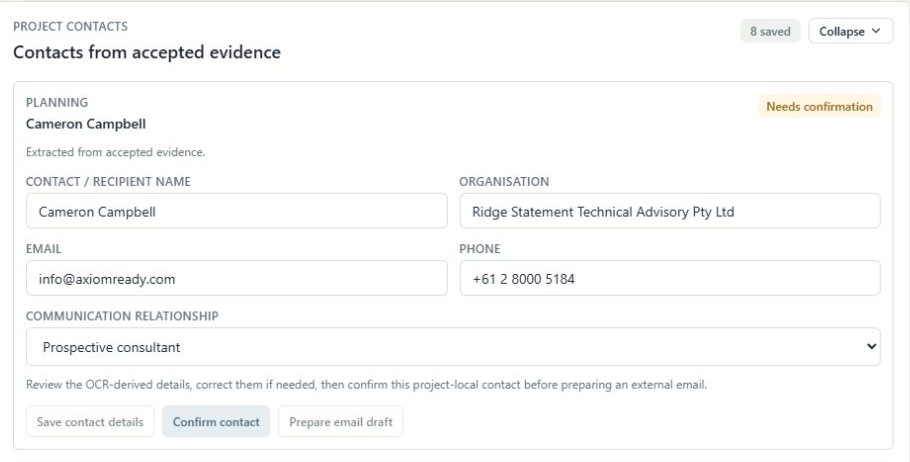
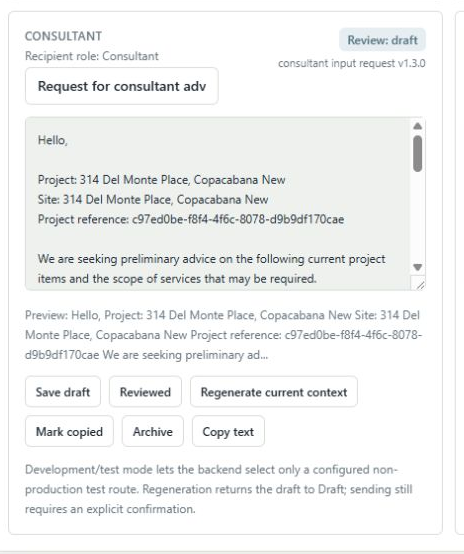
The evidence trail must distinguish a name found in a source from an approved recipient, and must prevent a contact from one project becoming an unreviewed recipient in another.
A project-local contact is confirmed, its current-context draft is reviewed and any send attempt has a retained project communication record.
AxiomReady never sends automatically. It sends only a reviewed draft explicitly confirmed by the user to its confirmed current-project recipient; a sent draft is immutable, and delivery status is not a professional or authority conclusion.
Enter or update your consultant
In Consultants, use Enter consultant details on the relevant professional-input card. Enter the name, organisation, email or phone, and communication relationship. The card supplies the consultant role. Update consultant details opens the same form for an existing contact; where several contacts exist, choose the intended one.
Save and confirm the intended contact
The modal's explicit save confirms these details and selects the preferred contact for this role in this project. A phone-only contact can be saved, but preparing email requires an email address. This records contact details; it does not appoint the consultant or complete an evidence task.
Review contacts found in evidence
A recognised consultant in accepted evidence is retained as a contact candidate. Review its source details and confirm the intended contact before correspondence. Later extraction does not replace your manually selected details; document provenance remains available.
Prepare a current-context template draft
Prepare email draft is available only for a confirmed contact with a recorded email in the current project. The backend refreshes the selected template from current project identity, recipient role and recorded coordination context, including relevant requirements, evidence, findings and gaps where the template uses them.
Make the final human edit and review
The user may adjust the subject and body for the actual query, save the draft, and mark it Reviewed. Regenerate current context discards local edits and returns the draft to Draft so it can be reviewed again.
Confirm the send and read the delivery record
Send reviewed email requires an explicit confirmation. Sent, failed or delivery-unknown status is retained for this project; do not repeat-send an indeterminate delivery without the recorded reconciliation path.
External email controls can be unavailable because the deployment policy or mail gateway is disabled. That is not a missing evidence task. Development/test routing, when enabled, is selected by the backend rather than by the browser. Inbound email capture is not part of this workflow.
Workspace: consultants / actions / communications
6. Evidence lifecycle
A saved source moves through durable intake, OCR or parsing, human review and a controlled evidence decision.
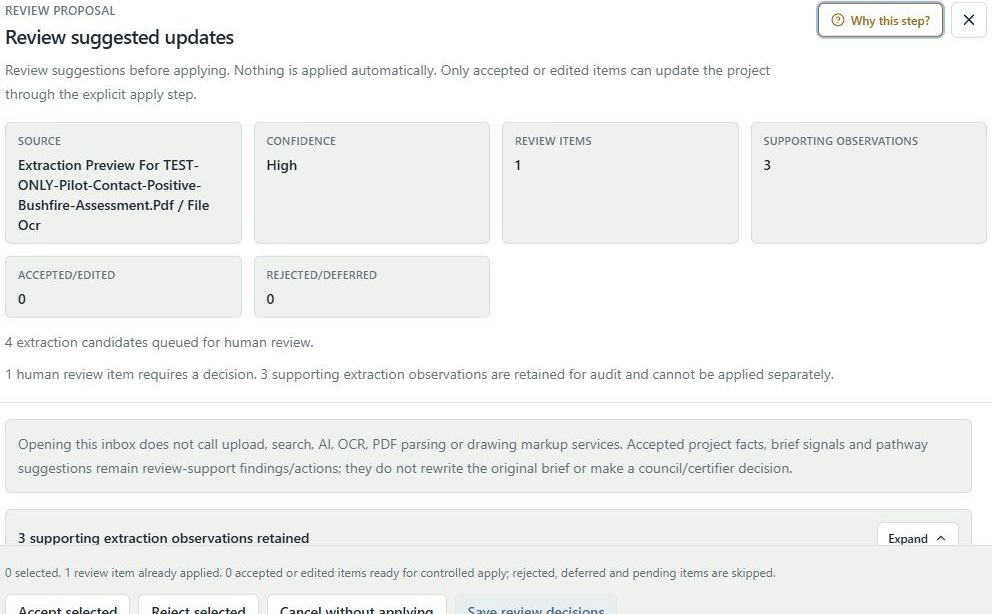
A file can be successfully stored and classified without being accepted as evidence for any requirement.
The affected task is accepted, not required, or otherwise final with an auditable human basis.
Upload, OCR, extraction, a document-nature match and an Applied review item do not automatically accept evidence or improve readiness.
Add a source
Use a guided Upload evidence control when it is attached to a card, or add a deliberate manual source when no requirement binding is intended.
Wait for analysis
The source is stored durably. OCR/parser output and document-role suggestions remain review-only candidates.
Review the proposal
Open the Review Inbox, accept, edit, reject or defer the human review item, then confirm the controlled apply step.
Confirm the evidence outcome
Only the evidence acceptance path changes the linked task and readiness. Re-running OCR replaces unreviewed candidates, not human audit decisions.
Review issued DA consent separately
DA package readiness does not establish issued consent. Current consent source explains intake when no candidate exists, offers authority OCR for a retained candidate, and enables Confirm DA approval evidence after detection. Record that separate professional decision there; endorsed/stamped plans still have their own task review. Guide this step names the existing consent-bundle PDF for a TEST ONLY exercise.
Workspace: requirements
7. Conditional requirements
A generic specialist umbrella is not a Missing blocker. Concrete specialist work appears only when its project trigger is confirmed.
Teams should not be penalised for hypothetical bushfire, BAL, structural or other specialist work that has not been shown to apply.
The trigger is confirmed, not triggered, or reversibly re-evaluated with its audit history retained.
Uploading or classifying a specialist report never back-infers that the specialist requirement applies to the project.
Review the applicability cue
Confirm whether the relevant condition is triggered from the project evidence and professional review basis.
Use the concrete task only when triggered
A confirmed trigger creates only its concrete specialist task; the generic umbrella remains non-actionable.
Record not-triggered or reversal deliberately
A not-triggered decision removes the readiness penalty but preserves audit history. A later reversal is deterministic and does not duplicate tasks.
Workspace: requirements / findings
8. Site investigation
Site Investigation returns provenance-linked observations for the subject site and, where relevant, nearby context.
Public-source observations can identify items that need professional checking against project evidence.
Relevant source results, non-results and follow-up work are visible against the project.
Source observations do not prove frontage, boundaries, setbacks, approval, service adequacy or final compliance.
Run the bounded source check
Provide an address or Lot/DP cue and inspect the returned component coverage and capture time.
Read provenance and scope
Distinguish subject observations from neighbouring or contextual observations before relying on them.
Create professional follow-up
Use the source as a review cue; verify material issues against current project evidence and the responsible professional.
A component marked not returned is not a finding that the condition is absent or inapplicable. Source availability can vary by configured adapter and current public data.
Workspace: requirements / readiness
9. Source reconciliation
When a public-source observation and project evidence differ, retain both, identify the scope difference and record the professional resolution path.
A project record remains useful only when it shows why a discrepancy was investigated rather than silently overwriting one source with another.
The comparison, source provenance, follow-up and any coordination request are retained in the project record.
Reconciliation is a review and coordination workflow. It never declares which source is legally conclusive or makes an authority decision.
Identify the conflict precisely
Compare the statement, source scope, date and project relationship instead of treating all labels as equivalent.
Keep both records visible
Do not overwrite the public observation or uploaded source. Attach the professional review basis and any request for clarification.
Resolve through the right role
Use a reviewed project communication or professional decision to document the resolution path.
Workspace: requirements / findings / communications
10. Workspace views
Collection views help teams scan project records, source detail and decisions without replacing the focused workflow card.
A project can have many saved sources and decisions; compact, list or grid views make that history usable while preserving the current target state.
The user can locate a source or decision, open its detail and return to the active workflow without changing project state.
Changing a collection presentation is a personal workspace preference. It does not alter evidence, readiness, role assignments or an audit record.
Choose a readable presentation
Use the collection control to move between available layouts. The preference is retained for the workspace.
Inspect the record
Open source details or the Decision Trail to understand provenance, review and lifecycle events.
Return to the current target
Use the highlighted requirement, recommended action or Target States to resume live readiness work.
Workspace: requirements / findings / readiness
11. Professional review
Review warnings, extraction candidates and reliance decisions deliberately before treating a package as ready.
Warnings remain visible until retained review evidence gives the project a documented basis.
A professional has recorded a defensible review outcome such as Resolve for submission use or Accept with risk.
Resolve for submission use is not council approval, certification or a legal conclusion.
Review the retained basis
Check the source, acceptance decision, gaps and any risk statement before resolving a warning.
Record the professional decision
Use the stated review outcome and package basis. Keep unresolved uncertainty visible rather than masking it.
Use the readiness output carefully
A generated readiness PDF is a project review artefact for a professional; it is not a lodgement or approval document.
Workspace: findings / readiness
12. CC readiness
CC submission-ready at 100% means the package is ready for external submission after a retained professional review.
The readiness review preserves the human decision and its package basis before an external submission is recorded.
CC submission readiness can be 100% after all active CC requirements are disposed and a professional readiness review is recorded.
CC submission-ready at 100% does not mean a Construction Certificate has been issued.
Complete the active CC checklist
Accepted evidence, not-required decisions and reviewed conditional requirements determine the active checklist state.
Record professional readiness review
Enter the reviewing professional and package basis before relying on the submission-ready status.
Move to external work only when it happened
The next lifecycle record is an external submission, not an automatic lodgement by AxiomReady.
Workspace: readiness
13. External submission
Record an external CC submission only after it has happened outside AxiomReady.
The lifecycle distinguishes a prepared package from a real external lodgement or submission.
The record identifies the receiving certifier or authority, submission type and reference.
AxiomReady records a submission; it does not lodge one and a submission record is not an authority outcome.
Use the real receiving party
Enter the certifier or authority and the reference used in the actual external submission.
Record once
Wait for the saved submission record and use it for later RFI or authority-evidence linkage rather than creating duplicate history.
Workspace: readiness
14. CC finalisation
CC finalisation links a real external submission to reviewed authority evidence and one professional confirmation, then creates a retained receipt.
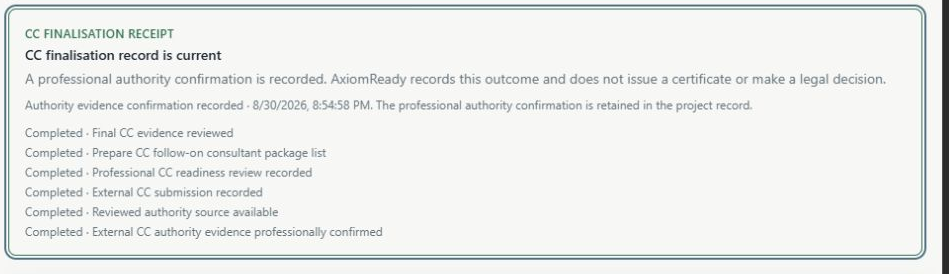
It prevents a source upload, OCR title or submission record from being mistaken for a Construction Certificate outcome.
The CC finalisation receipt lists the completed lifecycle steps and the project retains the linked authority confirmation.
Only reviewed project-local authority evidence plus explicit professional confirmation can record CC authorisation received. AxiomReady does not issue a certificate.
Record professional readiness and the external submission
These are separate retained records. The submission may be selected later as the authority outcome's project link.
Upload and review the authority source
Save the issued decision or certificate through the authority-evidence route and review its extraction outcome; do not rely on filename or OCR alone.
Make one professional confirmation
Select the recorded submission and reviewed source, enter the issuing authority, certificate reference and professional confirmation note.
Read the terminal receipt
The receipt is the current finalisation record. RFI/revision controls are used only when an actual external request or revision occurs.
Workspace: readiness
15. RFI/revision
Record RFIs and reopen only the explicitly affected requirements for review.
A revision should not silently rewrite unrelated readiness work.
Affected requirements are reviewed again and the RFI has a retained resolution basis.
An RFI resolution is project review work, not an external authority decision.
Select the recorded submission
An RFI belongs to a real retained external submission, not to a draft or readiness score.
Scope the affected work
Choose only the requirement actually affected by the request or revision.
Resolve with an audit note
Record the response basis and review the reopened requirement without changing unrelated evidence.
Workspace: readiness / requirements
16. Authority outcome
Authority outcome is separate from readiness, evidence extraction and the external submission record.
The project must show both the source and the professional confirmation that makes the authority result reliable as a project record.
A confirmed outcome is visible only after the CC finalisation sequence is complete.
OCR, stamps and extraction signals remain candidates; they cannot confirm authority directly.
Separate evidence from outcome
An authority source can be saved and reviewed before the outcome is confirmed.
Use the finalisation receipt
Use the retained CC finalisation record as the project-side outcome record, while the external authority remains the issuing party.
Workspace: readiness
17. AI review
AI can prepare bounded ReviewProposal candidates from permitted project material, but no suggestion changes the project until a human inspects, selects and confirms it.
Suggestions can reduce review effort while preserving the human evidence, requirement, finding, communication and authority decision boundaries.
A human has inspected each actionable proposal item and only accepted or edited selections pass through the controlled apply step.
AI never accepts evidence, resolves warnings, creates a live requirement, sends email, certifies compliance, records external submission or confirms authority by itself.
Check availability and scope
The workspace shows whether an AI review capability is available and what bounded task it will run.
Inspect each actionable candidate
AI output is not a conclusion. Read its source context and choose Accept, edit, reject or defer for each human-review item; supporting observations remain audit context rather than standalone changes.
Confirm only the selected changes
Controlled apply is a separate human action. Only accepted or edited items may update the project, while rejected, deferred and unreviewed items are skipped.
Use the result as review support
Cancelling, failing or completing an AI task with no accepted item applies nothing. Re-check the affected readiness, evidence or communication state after the controlled apply result.
AI availability depends on the deployment policy and the selected capability. An unavailable control is not a readiness failure or evidence gap.
Workspace: readiness
18. AI access & usage
Where BYOK AI Review is enabled, a user connects their own provider key for the current browser session and reviews the operation result.
The user needs a clear distinction between availability, a session key, estimated usage and a review-only result.
The operation record and its human-review candidates are visible; the key is not retained as project data.
AxiomReady does not retain a BYOK key in project state, expose hidden reasoning, or convert provider output into evidence automatically.
Connect for this browser session
Provide a valid user key only where the availability control permits it; disconnecting removes it from the browser session.
Review the estimate and result
Read the stated scope and any usage information before running; inspect the final operation record and candidate status.
Keep the human decision separate
Provider output can assist a review but cannot accept evidence, resolve a warning or determine an external outcome.
Workspace: readiness
19. Safe operations
AxiomReady uses explicit confirmation, retained status and duplicate-safe controls for material actions.
A transient screen, toast or interrupted request should not make users guess whether a source, submission, communication or confirmation was recorded.
The relevant record, Decision Trail or refreshed workflow state confirms the action outcome.
A confirmation dialog asks for user intent; it does not turn the action into an authority, professional or compliance decision.
Read the confirmation wording
Confirm destructive or external actions only after checking the stated target and consequences.
Wait for the retained status
Use the refreshed card, saved record, Decision Trail or status message instead of clicking repeatedly.
Recover through the record
If the screen changes or a request fails, reopen the saved source, communication, submission or current target to inspect the retained state.
Workspace: actions / requirements / readiness
20. Share project
Share project uses explicit email membership and project roles.
Access must be attributable to a person and role, not inferred from a project identifier.
A member has an explicit editor, reviewer or viewer role in the project membership register.
Clone is not sharing, and a project ID is not a share link.
Workspace: brief
21. Pilot sandbox
A pilot sandbox is a separate, sanctioned practice workspace.
It lets a pilot learn the workflow without changing another project owner's data.
The pilot workspace remains isolated and is clearly identified as a sandbox.
A sandbox is not a production project and does not grant access to shared projects.
Static operating manual
This pilot-specific guide is bundled static reference content. It explains what to do now, which synthetic test source is appropriate when a current card permits one, and the professional boundary at every DA → CC lifecycle stage.
Pilot 1 · Exempt Development
Three separate sources exercise eligibility, minor-works scope and site/height/location review in a disposable Exempt project.
Return to the current evidence card and perform its controlled upload/review action.
Exempt Development · Direct pilot source
TEST-ONLY-Exempt-Development-Eligibility-Checklist.pdf
Use the separate minor-works Project context from the combined Required Inputs + Exempt pilot pack. Upload this source through the current eligibility card, wait for extraction, inspect the current role/scope and explicitly confirm its evidence review.
Why: The eligibility review must stay separate from the minor-works drawing/scope and site review. A document upload does not establish that the proposal qualifies as exempt.
Next: Confirm the reviewed eligibility source, then follow the backend's next current task; do not force another card complete.
Exempt Development · Direct pilot source
TEST-ONLY-Minor-Works-Drawings-and-Scope.pdf
Upload this distinct ground-level garden-edging scope through the current card. Review the synthetic footprint, height, location and exclusions against the separate Exempt test context, then confirm the exact current evidence draft.
Why: The Exempt pilot scope differs from the DA/CC first-floor addition. Keep these source roles and proposal scopes separate.
Next: Record the reviewed source for this task and continue to the backend-selected site/eligibility review.
Exempt Development · Direct pilot source
TEST-ONLY-Exempt-Site-Constraint-Height-and-Location-Check.pdf
Upload this source through the current card. Inspect its parcel routing label, synthetic dimension/location assumptions and unresolved mapping sources. Confirm only the current source issue through professional evidence review.
Why: A survey, title or online parcel match alone does not supply this proposal-specific review; source no-match is not proof that exclusions are absent.
Next: Confirm the scoped test source and follow the next current review without an automatic eligibility outcome.
Pilot 2
Use this operating guide beside a clearly labelled pilot or clone. Its synthetic files exercise a controlled workflow; they must never be represented as real project evidence or lodged with an authority.
Establish the project, pathway and current target before starting file intake.
Pilot 3
AxiomReady is a readiness and review-support workspace. It helps organise facts, sources, evidence, findings, actions and communications; it does not replace the architect, planner, certifier, engineer, council or other decision-maker.
Follow the current focused card; the guide never changes the workflow itself.
Project context
Confirm brief, site identity, current target and pathway. No approval or compliance conclusion follows.
Source / File Intake
Record what was received. Upload never accepts it as evidence by itself.
Recognition / Review Proposal
Accept, edit, reject or defer the proposed role and facts. This is not checklist completion.
Professional evidence confirmation
Confirm source, scope, linkage and notes through Add Evidence. This is the explicit human decision.
Readiness / workflow
Resolve only current gaps, warnings and actions; future/retained work stays separate.
External decision
Record external submission and later professional authority evidence confirmation. Neither is inferred.
Pilot 4
The intended path is project/site basis → DA evidence → DA readiness → CC follow-on → CC evidence → professional readiness review → external submission → authority source → authority confirmation. Conditional and RFI branches can interrupt it without erasing the main path.
Use the active pathway and current target—not a historical card—to decide what to do now.
Project / site basis
Confirm brief, site, Lot/DP and working pathway before uploading every file.
DA evidence and readiness
Use current cards, controlled review and professional confirmation; support/index files never replace missing evidence.
DA → CC transition
Prior DA records may remain retained for audit/reuse but are not automatically current CC actions.
CC evidence
Confirm package, certifier forms, conditions and applicable consultant evidence.
CC finalisation
Record professional review, external submission, authority source and human authority confirmation in order.
Pilot 5 · Site investigation
Site Investigation returns current public-source context for the subject property. It is a review aid and provenance source, not accepted evidence by itself.
Use the current planning-controls or survey card only after site identity is sufficiently reviewable.
Site investigation · Direct pilot source
TEST-ONLY-Pilot-Contact-Positive-Location-Survey.pdf
Upload from the focused survey card and review site identity, Lot/DP, boundaries, levels and survey currency before evidence confirmation.
Why: The survey is a source of site facts and needs its own formal document identity.
Next: Open Review Inbox, apply only the reviewed proposal, then continue through task-bound Add Evidence and professional confirmation.
Site investigation · Direct pilot source
TEST-ONLY-Pilot-Contact-Positive-Planning-Controls-and-Constraints-Review.pdf
Use as a reviewed planning input and keep public-source observations independently attributable to their source and capture date.
Why: Planning controls and constraints can affect later evidence requirements and specialist applicability.
Next: Review any current source results and use controlled project facts only after human confirmation.
Pilot 6
This is the core controlled path. A source can be uploaded, recognised and Applied while the Evidence Task correctly remains Missing until its distinct professional confirmation is recorded.
After an Applied item, look for the explicit evidence-confirmation/Add Evidence route rather than re-uploading immediately.
1. Start at the exact task
Click Upload evidence from the focused card where possible so the upload carries its intended task binding.
2. Wait for OCR/extraction
A job can complete without altering evidence, readiness or focus.
3. Open Review Inbox
Inspect canonical document nature, generic role and proposed facts.
4. Make the human review decision
Accept, edit, reject or defer. Nothing is applied automatically.
5. Apply
Applied can record only role/fact review; it is not necessarily Accepted evidence.
6. Add Evidence
Use the safe task-bound route and record professional confirmation before expecting the task to close.
Pilot 7 · Development Application
Not every DA card appears in every project. Use the cards AxiomReady marks current for the active DA pathway; this is a practical pilot order, not a statutory checklist.
Once current DA evidence, conditions, findings and actions are resolved, move to CC only through the explicit pathway/target workflow.
Project setup · Direct pilot source
TEST-ONLY-Pilot-Contact-Positive-Client-Engagement-and-Authority.pdf
Review the client authority, project scope and source identity before a professional confirms the relevant project input.
Why: Commissioning authority and owner consent are separate controls with different purposes.
Next: Confirm the project input/evidence through its explicit review route; do not use it to close owner consent by substitution.
Development Application · Direct pilot source
TEST-ONLY-Pilot-Contact-Positive-DA-Architectural-Drawing-Package.pdf
Upload through the focused task and review the drawing-set identity, site, issue, revision and coordination before Add Evidence.
Why: Architectural drawings need their own source identity and must not be inferred from incidental plan words in a report.
Next: Use the safe task-bound evidence route and record professional confirmation of the reviewed package.
Development Application · Direct pilot source
TEST-ONLY-Pilot-Contact-Positive-Development-Cost-Estimate.pdf
Review the estimate’s basis, scope and currency. Record required human cost information where the card asks for it before relying on thresholds or fees.
Why: A cost value can govern downstream requirements, but the source must still be reviewed in project context.
Next: Record the relevant professional/project cost decision, then let the backend reconcile any conditional task safely.
Site investigation · Direct pilot source
TEST-ONLY-Pilot-Contact-Positive-Location-Survey.pdf
Upload from the focused survey card and review site identity, Lot/DP, boundaries, levels and survey currency before evidence confirmation.
Why: The survey is a source of site facts and needs its own formal document identity.
Next: Open Review Inbox, apply only the reviewed proposal, then continue through task-bound Add Evidence and professional confirmation.
Development Application · Direct pilot source
TEST-ONLY-Pilot-Contact-Positive-Notification-Plan.pdf
Use the focused card and review notification purpose, drawing issue and current DA applicability before confirmation.
Why: Notification-purpose evidence can be a distinct document role even when it looks like a drawing package.
Next: Record the task-bound professional decision or leave it untouched if the task is not current.
Project setup · Direct pilot source
TEST-ONLY-Pilot-Contact-Positive-Owner-Consent-and-Applicant-Authority.pdf
Review owner identity, site, signatures and authority on the source before an explicit evidence confirmation.
Why: Owner consent is a separate project control from a client’s authority to commission work.
Next: Confirm the linked evidence only after a human records scope and source review.
Site investigation · Direct pilot source
TEST-ONLY-Pilot-Contact-Positive-Planning-Controls-and-Constraints-Review.pdf
Use as a reviewed planning input and keep public-source observations independently attributable to their source and capture date.
Why: Planning controls and constraints can affect later evidence requirements and specialist applicability.
Next: Review any current source results and use controlled project facts only after human confirmation.
Development Application · Direct pilot source
TEST-ONLY-Pilot-Contact-Positive-Statement-of-Environmental-Effects.pdf
Upload through the current task, review the formal planning-document identity and scope, then complete professional Add Evidence confirmation.
Why: A formal SEE is a planning narrative, not a DA drawing package just because it mentions plans or sections.
Next: Apply the reviewed proposal and use the safe evidence-confirmation route for this exact task.
Pilot 8 · DA → CC transition
When the working target changes from DA to CC, DA work can stay visible for audit and controlled reuse without remaining current or blocking the new target.
Allow CC-only cards to become current after the pathway transition; use the current CC task rather than an older DA card.
DA → CC transition · Support / QA fixture
TEST-ONLY-Pilot-Contact-Positive-Consent-Conditions-Compliance-Matrix.pdf
Keep the matrix as support material. Review the underlying authority source before relying on a condition or workflow-stage conclusion.
Why: A matrix can help organise obligations but does not substitute for the authority record it summarises.
Next: Use the direct consent notice bundle for the current consent-condition evidence task.
DA → CC transition · Direct pilot source
TEST-ONLY-Pilot-Contact-Positive-Current-DA-Consent-and-Approved-Plans-Bundle.pdf
Use this authority notice bundle for consent reference, determination and workflow-stage condition review; use the separate stamped-plans source for endorsed-plan evidence.
Why: Prior-to-CC, prior-to-work and prior-to-OC conditions can require different current evidence.
Next: Complete the exact controlled consent-condition evidence confirmation, then review any linked CC consequence separately.
DA → CC transition · Direct pilot source
TEST-ONLY-Pilot-Contact-Positive-DA-Endorsed-and-Stamped-Plans.pdf
Use the endorsed/stamped-plans source, not the consent notice bundle, and record the separate professional review of issue, approval status and currency.
Why: CC coordination needs the approved DA drawing basis, not merely a current architectural drawing package.
Next: After review, complete the task-bound confirmation; later CC work may still require a fresh professional linkage review.
DA → CC transition · Support / QA fixture
TEST-ONLY-Pilot-Contact-Positive-Historical-DA-Context.pdf
Keep historic material retained for audit and compare it with current authority/project context before relying on it.
Why: Retained history can remain visible without becoming an active action or readiness blocker.
Next: Return to the current DA-to-CC card; do not promote history into a live task by inference.
Pilot 9 · CC finalisation
Finish current CC evidence before the explicit finalisation sequence: follow-on action, professional readiness review, external submission, authority source, professional authority confirmation and terminal receipt.
Follow the single backend-owned primary CC step; terminal receipt has no active card guide control.
Current CC evidence
Use direct CC forms, construction package and any applicable separate structural/consultant review.
Follow-on action
Complete any current package/consultant coordination action separately from evidence.
Professional review
Enter a retained reviewer and package-basis note. No pilot PDF is required.
External submission
Record the actual certifier/authority and stable submission reference in the form.
Authority source
Upload/review the external decision or certificate source. It remains a source until separately confirmed.
Authority confirmation
Select reviewed source and recorded submission, then make one professional confirmation.
Receipt
Review the retained terminal receipt; it does not create further active work or a new authority decision.
Construction Certificate · Direct pilot source
TEST-ONLY-Pilot-Contact-Positive-CC-Certifier-Appointment-and-Declarations.pdf
Upload through the focused card, review the recognised form role, then complete the separate professional evidence confirmation.
Why: Certifier onboarding can block package assessment even when drawings are ready.
Next: The task becomes Accepted only after a human confirms the source, scope and linkage.
Construction Certificate · Direct pilot source
TEST-ONLY-Pilot-Contact-Positive-CC-Construction-Drawing-Package.pdf
Upload the package from the current card, review its issue and coverage, then record the distinct professional evidence decision.
Why: CC readiness depends on the coordinated package, not a filename or one isolated drawing sheet.
Next: Use package coverage or Add Evidence only where the backend offers the safe task-bound route.
CC finalisation · Direct pilot source
TEST-ONLY-Pilot-Contact-Positive-Construction-Certificate-and-Approval-Notice.pdf
Upload the authority source, review/apply its document role, then wait for the separate Confirm external CC authority evidence step.
Why: A source and a professionally confirmed authority outcome are intentionally separate lifecycle gates.
Next: After source review, select the reviewed project source in Confirm external CC authority evidence; no repeat upload is required unless another source is needed.
CC finalisation · Runtime input
No dedicated pilot PDF — complete the human review/form input.
Enter the reviewer role and a retained professional note/package basis, then explicitly record the review.
Why: CC evidence readiness and retained human readiness review are distinct controls.
Next: Record external CC submission when that becomes the current primary step.
CC finalisation · Runtime input
No dedicated pilot PDF — complete the human review/form input.
Record the actual certifier/authority name, type and a stable submission reference in the form. Review duplicates rather than recording the same submission twice.
Why: A recorded external submission is an explicit human record, separate from authority evidence.
Next: Upload and review a returned authority decision/certificate source when the current step changes to authority source.
CC finalisation · Runtime input
No dedicated pilot PDF — complete the human review/form input.
Select the recorded external submission and reviewed project source, enter issuer/reference as available, then record one human confirmation note.
Why: This is the boundary between a reviewed document source and a retained professional authority-evidence confirmation.
Next: The CC finalisation receipt becomes current; no active Guide this step control remains on the terminal receipt.
Pilot 10 · Development Application
Applicability comes first, evidence comes second. The generic specialist concept stays non-actionable; a concrete task appears only after a confirmed trigger or explicit professional resolution.
If no relevant task is current, do not upload a specialist fixture; first resolve applicability through the current project workflow.
Development Application · Conditional pilot source
TEST-ONLY-Pilot-Contact-Positive-BASIX-Certificate.pdf
If this is the current applicable task, upload the pilot BASIX certificate from its task card and complete review plus professional evidence confirmation.
Why: BASIX is conditional evidence. The concrete task must be current before it can affect readiness.
Next: Review the extracted candidate, then complete the separate Add Evidence confirmation only if the current task is safely linked.
Development Application · Conditional pilot source
TEST-ONLY-Pilot-Contact-Positive-Bushfire-Assessment.pdf
Do not upload to manufacture a trigger. When the specific task is current, use its guided upload path and review the report currency, site and BAL basis.
Why: The conditional rule and concrete evidence task are separate so a generic specialist umbrella never becomes a false blocker.
Next: After controlled review, either record task-bound evidence or retain the source as review-only context if the trigger is not applicable.
Development Application · Conditional pilot source
TEST-ONLY-Pilot-Contact-Positive-Erosion-and-Sediment-Control-Plan.pdf
Use the exact current task. Review measures, scope and current relevance; use controlled cross-target reuse only where the UI exposes it.
Why: Construction-stage controls can be conditional and may require a new review even for a retained DA source.
Next: Record the task-specific review or a separate controlled reuse decision.
Construction Certificate · Conditional pilot source
TEST-ONLY-Pilot-Contact-Positive-Fire-Safety-Report.pdf
Confirm applicability first, then use the matching current consultant/evidence route. Keep fire-safety separate from bushfire/BAL assessment.
Why: Specialist inputs are scope-dependent and cannot be inferred from the presence of a report.
Next: Complete the active specialist review path or retain the source as non-closing context.
Development Application · Conditional pilot source
TEST-ONLY-Pilot-Contact-Positive-Geotechnical-and-Soil-Information.pdf
Review project identity, report currency and the engineering basis through the actual current specialist route.
Why: Soil and geotechnical relevance is a professional scope decision, not something proven by a file existing.
Next: Record the selected current specialist evidence decision, or retain the source without changing readiness.
Development Application · Conditional pilot source
TEST-ONLY-Pilot-Contact-Positive-Heritage-Assessment.pdf
Confirm the scope/trigger, then use the exact specialist route; never force the document into a generic specialist card.
Why: Heritage evidence is project-dependent and must remain traceable to the actual current scope.
Next: Review the current specialist task or record an explicit not-applicable/professional decision where supported.
Development Application · Conditional pilot source
TEST-ONLY-Pilot-Contact-Positive-Stormwater-Drainage-Plan.pdf
Use the current specialist route and review the drainage proposal, discharge assumptions and project relevance. Reuse only through an explicit cross-target linkage route.
Why: Stormwater can be relevant across DA and CC, but each pathway can still need its own professional decision.
Next: Record the current task confirmation or controlled reuse decision; do not duplicate a physical source unnecessarily.
Construction Certificate · Conditional pilot source
TEST-ONLY-Pilot-Contact-Positive-Structural-Engineering-Design-and-Certificate.pdf
Review the specific design/certificate basis and responsible-professional context; do not merge it into architectural drawings.
Why: Structural evidence remains distinct even when a construction drawing package mentions structural work.
Next: Use the exact current structural task or controlled prior-evidence linkage review.
Development Application · Conditional pilot source
TEST-ONLY-Pilot-Contact-Positive-Traffic-Impact-Assessment.pdf
Confirm current scope first, then use the matching consultant/evidence route and complete controlled review.
Why: Traffic material is specialist scope evidence, not a generic document that should close any open task.
Next: Record the active specialist decision or retain the source without changing readiness.
Development Application · Conditional pilot source
TEST-ONLY-Pilot-Contact-Positive-Waste-Management-Plan.pdf
Use the exact current task and confirm construction/demolition scope. Use controlled reuse only when the UI exposes it.
Why: Waste evidence can be shared across stages only through explicit linkage and human review.
Next: Complete task-specific confirmation or an explicit reuse review without duplicating the physical source.
Pilot 11
A recognised/accepted source can expose a project-local contact candidate, but a human must still review and confirm the contact before AxiomReady makes it an available project recipient.
Confirm the current-project contact, review the generated draft and send only when the environment explicitly enables outbound delivery.
Pilot 12
Many apparent failures are controlled boundaries. Use the current task, source and review state to determine whether the next step is review, Add Evidence, an applicability decision or a manual focus report.
Recover through the exact current card or report the typed transition—do not guess a replacement workflow state.
Pilot 13
Useful feedback identifies the exact card, document and state transition where the experience became unclear.
Include project ID, target, card title, source, proposal status, expected next card, actual focus and reload behaviour in a defect note.
Pilot 14
Every listed PDF is synthetic pilot material. The catalogue identifies its direct, conditional or support/QA handling; it does not promise that every runtime card has a dedicated PDF.
Search by document role, card label, phase or filename; then return to the actual current card.
Development Application · Conditional pilot source
TEST-ONLY-Pilot-Contact-Positive-BASIX-Certificate.pdf
If this is the current applicable task, upload the pilot BASIX certificate from its task card and complete review plus professional evidence confirmation.
Why: BASIX is conditional evidence. The concrete task must be current before it can affect readiness.
Next: Review the extracted candidate, then complete the separate Add Evidence confirmation only if the current task is safely linked.
Development Application · Conditional pilot source
TEST-ONLY-Pilot-Contact-Positive-Bushfire-Assessment.pdf
Do not upload to manufacture a trigger. When the specific task is current, use its guided upload path and review the report currency, site and BAL basis.
Why: The conditional rule and concrete evidence task are separate so a generic specialist umbrella never becomes a false blocker.
Next: After controlled review, either record task-bound evidence or retain the source as review-only context if the trigger is not applicable.
Construction Certificate · Direct pilot source
TEST-ONLY-Pilot-Contact-Positive-CC-Certifier-Appointment-and-Declarations.pdf
Upload through the focused card, review the recognised form role, then complete the separate professional evidence confirmation.
Why: Certifier onboarding can block package assessment even when drawings are ready.
Next: The task becomes Accepted only after a human confirms the source, scope and linkage.
Construction Certificate · Support / QA fixture
TEST-ONLY-Pilot-Contact-Positive-CC-Certifier-Handoff-Package.pdf
Treat this as package/handoff support. Use the current action or communication workflow rather than presenting it as a one-to-one evidence-closing upload.
Why: A handoff bundle can help coordinate CC work without replacing its separate evidence and professional review decisions.
Next: Complete the actual current action, evidence or communication card; do not force a substitute closure.
Construction Certificate · Direct pilot source
TEST-ONLY-Pilot-Contact-Positive-CC-Construction-Drawing-Package.pdf
Upload the package from the current card, review its issue and coverage, then record the distinct professional evidence decision.
Why: CC readiness depends on the coordinated package, not a filename or one isolated drawing sheet.
Next: Use package coverage or Add Evidence only where the backend offers the safe task-bound route.
Construction Certificate · Support / QA fixture
TEST-ONLY-Pilot-Contact-Positive-CC-Readiness-Package-Index.pdf
Review it as context or package support when appropriate; continue with the actual current CC Evidence Task.
Why: An index can explain a package but cannot prove that each component has been accepted.
Next: Resolve the specific missing CC evidence or professional review card.
CC finalisation · Support / QA fixture
TEST-ONLY-Pilot-Contact-Positive-CC-RFI-and-Revision-Response.pdf
Create or update the RFI through the explicit CC form, link affected evidence where supported, then review any revised source through the normal evidence lifecycle.
Why: An RFI is a controlled exception path and should not be created to make a pilot screen change.
Next: Return to the reopened evidence task or record the RFI resolution; unrelated requirements remain unchanged.
Project setup · Direct pilot source
TEST-ONLY-Pilot-Contact-Positive-Client-Engagement-and-Authority.pdf
Review the client authority, project scope and source identity before a professional confirms the relevant project input.
Why: Commissioning authority and owner consent are separate controls with different purposes.
Next: Confirm the project input/evidence through its explicit review route; do not use it to close owner consent by substitution.
DA → CC transition · Support / QA fixture
TEST-ONLY-Pilot-Contact-Positive-Consent-Conditions-Compliance-Matrix.pdf
Keep the matrix as support material. Review the underlying authority source before relying on a condition or workflow-stage conclusion.
Why: A matrix can help organise obligations but does not substitute for the authority record it summarises.
Next: Use the direct consent notice bundle for the current consent-condition evidence task.
CC finalisation · Direct pilot source
TEST-ONLY-Pilot-Contact-Positive-Construction-Certificate-and-Approval-Notice.pdf
Upload the authority source, review/apply its document role, then wait for the separate Confirm external CC authority evidence step.
Why: A source and a professionally confirmed authority outcome are intentionally separate lifecycle gates.
Next: After source review, select the reviewed project source in Confirm external CC authority evidence; no repeat upload is required unless another source is needed.
DA → CC transition · Direct pilot source
TEST-ONLY-Pilot-Contact-Positive-Current-DA-Consent-and-Approved-Plans-Bundle.pdf
Use this authority notice bundle for consent reference, determination and workflow-stage condition review; use the separate stamped-plans source for endorsed-plan evidence.
Why: Prior-to-CC, prior-to-work and prior-to-OC conditions can require different current evidence.
Next: Complete the exact controlled consent-condition evidence confirmation, then review any linked CC consequence separately.
Development Application · Direct pilot source
TEST-ONLY-Pilot-Contact-Positive-DA-Architectural-Drawing-Package.pdf
Upload through the focused task and review the drawing-set identity, site, issue, revision and coordination before Add Evidence.
Why: Architectural drawings need their own source identity and must not be inferred from incidental plan words in a report.
Next: Use the safe task-bound evidence route and record professional confirmation of the reviewed package.
DA → CC transition · Direct pilot source
TEST-ONLY-Pilot-Contact-Positive-DA-Endorsed-and-Stamped-Plans.pdf
Use the endorsed/stamped-plans source, not the consent notice bundle, and record the separate professional review of issue, approval status and currency.
Why: CC coordination needs the approved DA drawing basis, not merely a current architectural drawing package.
Next: After review, complete the task-bound confirmation; later CC work may still require a fresh professional linkage review.
Development Application · Support / QA fixture
TEST-ONLY-Pilot-Contact-Positive-DA-Readiness-Package-Index.pdf
Keep it as supporting material and resolve every underlying current DA Evidence Task through its own controlled path.
Why: An index is useful for coordination but cannot stand in for the sources it lists.
Next: Continue with the current direct or conditional DA task.
Project setup · Support / QA fixture
TEST-ONLY-Pilot-Contact-Positive-Description-Document.pdf
Review the source as general context and do not force it into a missing checklist task.
Why: Some sources are useful to inspect without being evidence that closes a defined requirement.
Next: Return to the canonical current card for the project.
Development Application · Direct pilot source
TEST-ONLY-Pilot-Contact-Positive-Development-Cost-Estimate.pdf
Review the estimate’s basis, scope and currency. Record required human cost information where the card asks for it before relying on thresholds or fees.
Why: A cost value can govern downstream requirements, but the source must still be reviewed in project context.
Next: Record the relevant professional/project cost decision, then let the backend reconcile any conditional task safely.
Development Application · Conditional pilot source
TEST-ONLY-Pilot-Contact-Positive-Erosion-and-Sediment-Control-Plan.pdf
Use the exact current task. Review measures, scope and current relevance; use controlled cross-target reuse only where the UI exposes it.
Why: Construction-stage controls can be conditional and may require a new review even for a retained DA source.
Next: Record the task-specific review or a separate controlled reuse decision.
CC finalisation · Support / QA fixture
TEST-ONLY-Pilot-Contact-Positive-External-CC-Submission-Record.pdf
Use the explicit Record external CC submission form with the actual certifier/authority and a stable reference when that current runtime step is reached.
Why: External submission is an explicit human record, distinct from a PDF that resembles a submission record.
Next: Record the runtime submission, not this fixture, then follow the separate authority-source and confirmation steps.
Construction Certificate · Conditional pilot source
TEST-ONLY-Pilot-Contact-Positive-Fire-Safety-Report.pdf
Confirm applicability first, then use the matching current consultant/evidence route. Keep fire-safety separate from bushfire/BAL assessment.
Why: Specialist inputs are scope-dependent and cannot be inferred from the presence of a report.
Next: Complete the active specialist review path or retain the source as non-closing context.
Development Application · Conditional pilot source
TEST-ONLY-Pilot-Contact-Positive-Geotechnical-and-Soil-Information.pdf
Review project identity, report currency and the engineering basis through the actual current specialist route.
Why: Soil and geotechnical relevance is a professional scope decision, not something proven by a file existing.
Next: Record the selected current specialist evidence decision, or retain the source without changing readiness.
Development Application · Conditional pilot source
TEST-ONLY-Pilot-Contact-Positive-Heritage-Assessment.pdf
Confirm the scope/trigger, then use the exact specialist route; never force the document into a generic specialist card.
Why: Heritage evidence is project-dependent and must remain traceable to the actual current scope.
Next: Review the current specialist task or record an explicit not-applicable/professional decision where supported.
DA → CC transition · Support / QA fixture
TEST-ONLY-Pilot-Contact-Positive-Historical-DA-Context.pdf
Keep historic material retained for audit and compare it with current authority/project context before relying on it.
Why: Retained history can remain visible without becoming an active action or readiness blocker.
Next: Return to the current DA-to-CC card; do not promote history into a live task by inference.
Site investigation · Direct pilot source
TEST-ONLY-Pilot-Contact-Positive-Location-Survey.pdf
Upload from the focused survey card and review site identity, Lot/DP, boundaries, levels and survey currency before evidence confirmation.
Why: The survey is a source of site facts and needs its own formal document identity.
Next: Open Review Inbox, apply only the reviewed proposal, then continue through task-bound Add Evidence and professional confirmation.
Development Application · Direct pilot source
TEST-ONLY-Pilot-Contact-Positive-Notification-Plan.pdf
Use the focused card and review notification purpose, drawing issue and current DA applicability before confirmation.
Why: Notification-purpose evidence can be a distinct document role even when it looks like a drawing package.
Next: Record the task-bound professional decision or leave it untouched if the task is not current.
Project setup · Direct pilot source
TEST-ONLY-Pilot-Contact-Positive-Owner-Consent-and-Applicant-Authority.pdf
Review owner identity, site, signatures and authority on the source before an explicit evidence confirmation.
Why: Owner consent is a separate project control from a client’s authority to commission work.
Next: Confirm the linked evidence only after a human records scope and source review.
Site investigation · Direct pilot source
TEST-ONLY-Pilot-Contact-Positive-Planning-Controls-and-Constraints-Review.pdf
Use as a reviewed planning input and keep public-source observations independently attributable to their source and capture date.
Why: Planning controls and constraints can affect later evidence requirements and specialist applicability.
Next: Review any current source results and use controlled project facts only after human confirmation.
Development Application · Direct pilot source
TEST-ONLY-Pilot-Contact-Positive-Statement-of-Environmental-Effects.pdf
Upload through the current task, review the formal planning-document identity and scope, then complete professional Add Evidence confirmation.
Why: A formal SEE is a planning narrative, not a DA drawing package just because it mentions plans or sections.
Next: Apply the reviewed proposal and use the safe evidence-confirmation route for this exact task.
Development Application · Conditional pilot source
TEST-ONLY-Pilot-Contact-Positive-Stormwater-Drainage-Plan.pdf
Use the current specialist route and review the drainage proposal, discharge assumptions and project relevance. Reuse only through an explicit cross-target linkage route.
Why: Stormwater can be relevant across DA and CC, but each pathway can still need its own professional decision.
Next: Record the current task confirmation or controlled reuse decision; do not duplicate a physical source unnecessarily.
Construction Certificate · Conditional pilot source
TEST-ONLY-Pilot-Contact-Positive-Structural-Engineering-Design-and-Certificate.pdf
Review the specific design/certificate basis and responsible-professional context; do not merge it into architectural drawings.
Why: Structural evidence remains distinct even when a construction drawing package mentions structural work.
Next: Use the exact current structural task or controlled prior-evidence linkage review.
Development Application · Conditional pilot source
TEST-ONLY-Pilot-Contact-Positive-Traffic-Impact-Assessment.pdf
Confirm current scope first, then use the matching consultant/evidence route and complete controlled review.
Why: Traffic material is specialist scope evidence, not a generic document that should close any open task.
Next: Record the active specialist decision or retain the source without changing readiness.
Development Application · Conditional pilot source
TEST-ONLY-Pilot-Contact-Positive-Waste-Management-Plan.pdf
Use the exact current task and confirm construction/demolition scope. Use controlled reuse only when the UI exposes it.
Why: Waste evidence can be shared across stages only through explicit linkage and human review.
Next: Complete task-specific confirmation or an explicit reuse review without duplicating the physical source.
Pilot 15
Some states require an explicit form, human decision or real current material instead of a synthetic PDF. Never invent a fixture to make a card appear complete.
Complete the form or human review that the current card asks for, then let the backend choose the next step.
Construction Certificate · Runtime input
No dedicated pilot PDF — complete the human review/form input.
Complete the explicit project action with its retained note and owner; do not look for a pilot PDF merely because the action is open.
Why: Evidence completion and a follow-on coordination action are separate lifecycle records.
Next: The next backend-owned CC primary step becomes visible after the action is explicitly completed or otherwise disposed.
CC finalisation · Runtime input
No dedicated pilot PDF — complete the human review/form input.
Enter the reviewer role and a retained professional note/package basis, then explicitly record the review.
Why: CC evidence readiness and retained human readiness review are distinct controls.
Next: Record external CC submission when that becomes the current primary step.
CC finalisation · Runtime input
No dedicated pilot PDF — complete the human review/form input.
Record the actual certifier/authority name, type and a stable submission reference in the form. Review duplicates rather than recording the same submission twice.
Why: A recorded external submission is an explicit human record, separate from authority evidence.
Next: Upload and review a returned authority decision/certificate source when the current step changes to authority source.
CC finalisation · Runtime input
No dedicated pilot PDF — complete the human review/form input.
Select the recorded external submission and reviewed project source, enter issuer/reference as available, then record one human confirmation note.
Why: This is the boundary between a reviewed document source and a retained professional authority-evidence confirmation.
Next: The CC finalisation receipt becomes current; no active Guide this step control remains on the terminal receipt.
CC finalisation · Runtime input
No dedicated pilot PDF — complete the human review/form input.
Use the RFI form, link only affected evidence where supported and record a concise outcome. Revised sources still require their own controlled review.
Why: RFI is an exception workflow that must reopen only explicitly affected work.
Next: Return to the actual reopened evidence task or authority step.
Pilot 16
The glossary keeps the workflow’s controlled states distinct: Missing, Conditional, Under review, Applied, Accepted, Not required, Retained and Future do not mean the same thing.
Use the label together with the current card’s reason and the professional boundary, not as a standalone authority conclusion.
| Term | Meaning |
|---|---|
| Missing | Current evidence/task has not been resolved. Check that it is current/applicable before acting. |
| Conditional | A requirement can become active if its trigger/applicability is confirmed. |
| Draft | Work exists but has not reached the required review/confirmation state. |
| Under review | A source or task is being reviewed; it is not accepted evidence. |
| Changes requested | Reviewer requires correction/revision before acceptance. |
| Accepted | Evidence passed controlled professional confirmation for the linked task. |
| Not required | A current professional/source-backed decision says the requirement is not applicable in current scope. |
| Applied (Review Inbox) | The selected review item was applied; this can be role/fact review only and not Accepted evidence. |
| Aligned / Differs | Bounded comparison cues that still require review; neither is an automatic compliance conclusion. |
| SCOPE_MISMATCH | The source role does not safely support the exact guided task. Do not force the route. |
| REVIEW_REQUIRED | Useful context exists but not enough safe evidence for automatic task-bound handoff. |
| Retained / Future | Historical audit/reuse state or later-target planning state; neither is current work without explicit routing. |
| Prepare communication | Creates/focuses a controlled draft. It does not send. |